| Reetu |
LED Thermometer |
Saturday, November 16, 2013 5:10:16 AM |
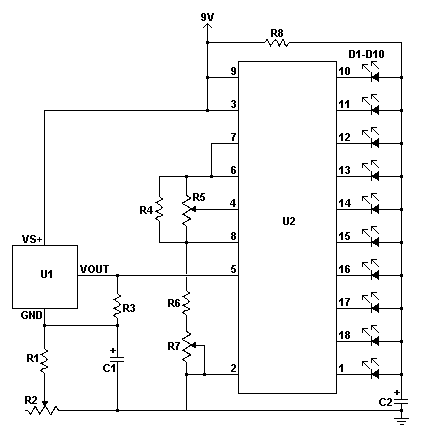
| plz tell me how the tempermerature is measured now ?
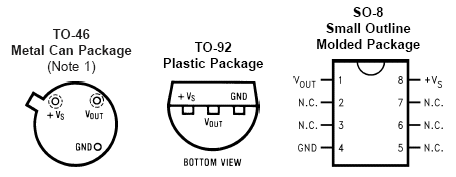
and is LM35DZ can be used in this instead of LM35DZ??
|
| Richard |
LED Thermometer |
Friday, January 11, 2013 1:35:06 PM |
| Please sir i constructed LED thermometer using LM340[instead of LM34DZ] and LM3914. I don't know where to read the temperature from in the circuit. Please how can i read the temperature of human being.Thank you Sir. |
| kiran |
LED Thermometer |
Saturday, November 27, 2010 9:52:22 AM |
| project is not succeeded |
| anonymousRic |
LED Thermometer |
Monday, September 13, 2010 2:58:35 PM |
| I take it this is an ac voltage not dc is that true |
| Jen |
LED Thermometer |
Sunday, January 24, 2010 5:14:05 PM |
| I found this circuit in my old Popular Electronics magazine from July 1996 on page 45. I decided to breadboard the circuit and test it. It worked perfectly after I calibrated it. |
| anonymous |
LED Thermometer |
Thursday, December 10, 2009 12:05:07 PM |
| Hi, please anybody till me how i know this project working or no. when i connect the voltage all leds lighting, pleaeaeaaeeaeaeaeaeaeaeaeaeeaes tiil me. |
| Jim |
LED Thermometer |
Monday, November 23, 2009 11:18:35 PM |
| I have built an extremely accurate digital thermometer, using a 4-1/2 LCD panel meter and an LM34DZ. Dont breath at it because the temp will go up 5 degrees from a couple feet!
Simply purchase the PM328 meter from All Electronics and order the temperature device, download the PDF data sheets,and you will be very pleased.
One word of caution. Because National Semiconductor cant seem to get their act together and test these devices, most are being distributed in the Centigrade format! Nine out of ten that I ordered from All Electronics were FORMATTED IN CELSCIUS and the tenth one was FAHRENHEIT. |
| Jim |
LED Thermometer |
Monday, November 23, 2009 10:27:37 PM |
| The reason most of you folks are having trouble with these projects is because the manufacture of the LM34DZ has failed to test them! they are mostly CENTERGRADE that's right, CELSIUS! I found out the hard way by ordering a dozen or so from ALL ELECTRONICS for 2.50 each. 8 out of 12 where CENTERGRADE. Therefore I have thrown 30 dollars in the sewer because of the incompetance of NATIONAL SEMICONDUCTOR? When I asked for my money back, they, in so many words told me to piss-off. |
| anonymous |
LED Thermometer |
Friday, May 01, 2009 6:49:49 AM |
| it is not a trust worthy experiment i have tried this but the result is the temperature is incorrectly shown |
| anonymous |
LED Thermometer |
Tuesday, November 18, 2008 2:01:36 PM |
| I was able to get this to operate by removing the capacitor C2. You should only be using this capacitor if your LED leads are more than six inches in length. |